In Studio, click New Secret on the client’s row and use the new one; the old one keeps working until you revoke it. In Core, click Regenerate.
How do I replace a secret?
Create a new one and rerun the install script with it. In Studio, then click the client’s row and Revoke the old secret; in Core, Regenerate revokes it for you.
Can two machines share one credential?
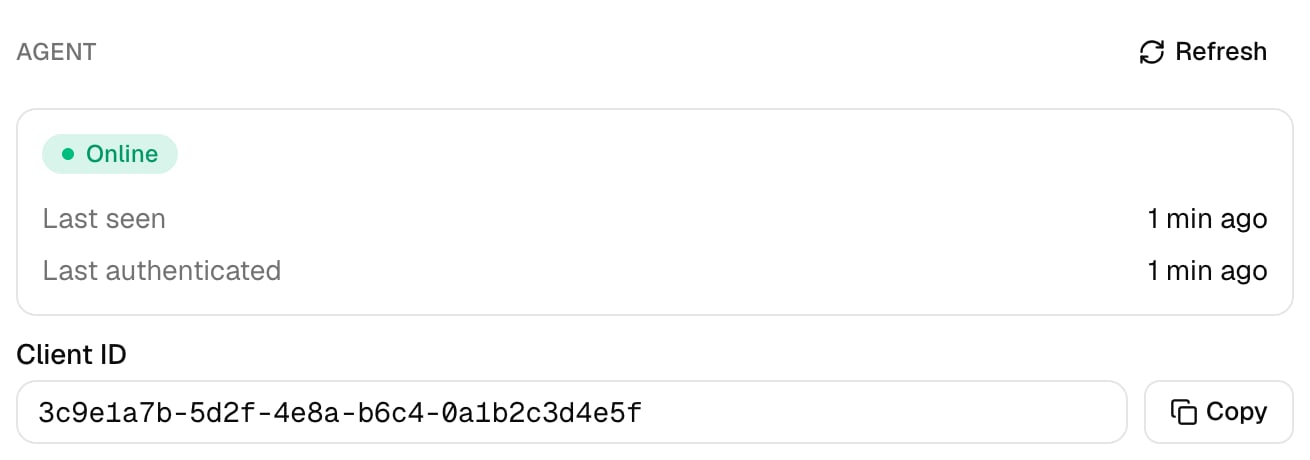
Create a client for each machine instead. Agent Summary on the client’s page then shows each one’s Status and Last Seen separately.
⌘I
{"docsConfig":{"theme":"almond","$schema":"https://mintlify.com/docs.json","name":"Triggr University","description":"Set up and run Triggr Core and Triggr Studio, and connect the tools your workflows use.","colors":{"primary":"#4A7FC7","light":"#6A9FE0","dark":"#3A6CB5"},"logo":{"light":"https://mintcdn.com/triggr/dXDzJtUmPBaHtkPV/logo/msp-process-light.png?fit=max\u0026auto=format\u0026n=dXDzJtUmPBaHtkPV\u0026q=85\u0026s=17a36d837b83a230254e3e7f6b1553fd","dark":"https://mintcdn.com/triggr/dXDzJtUmPBaHtkPV/logo/msp-process-dark.png?fit=max\u0026auto=format\u0026n=dXDzJtUmPBaHtkPV\u0026q=85\u0026s=4d9cef71289332e83394ec9c6357ac63"},"favicon":"https://mintcdn.com/triggr/MwzXHG3UWzFixdSz/favicon.svg?fit=max\u0026auto=format\u0026n=MwzXHG3UWzFixdSz\u0026q=85\u0026s=c356f429061b4109f2c5aeb090381353","appearance":{"default":"dark"},"background":{"color":{"light":"#FFFFFF","dark":"#0F0F17"}},"fonts":{"heading":{"family":"Geist","weight":500},"body":{"family":"Geist","weight":400}},"contextual":{"options":["copy","view","chatgpt","claude","mcp","add-mcp","cursor","vscode"],"display":"header"},"styling":{"latex":true},"navigation":{"pages":[]}},"deployment":{"deploymentMetadataValue":{"subdomain":"triggr","hasAudioNarration":false,"actualSubdomain":"triggr","customDomains":["kb.mspprocess.com"],"gitSource":{"type":"github","owner":"phishr-ai","repo":"triggr-university","deployBranch":"main","contentDirectory":"","isPrivate":true,"mountPath":"","label":""},"entitlements":{"AI_CHAT":{"status":"DISABLED"},"WEB_MCP":{"status":"DISABLED"},"NARRATION":{"status":"DISABLED"}},"buildId":"6af76c587b1d5fddacc840cf","clientVersion":"0.0.4138","searchFilterCounts":[{"language":"default","tag":"Triggr","count":233},{"language":"default","tag":"MSP Process","count":148},{"language":"default","tag":"Integrations","count":104},{"language":"default","tag":"API reference","count":50},{"language":"default","tag":"Triggr Core","count":50},{"language":"default","tag":"Endpoints","count":49},{"language":"default","tag":"Triggr Studio","count":34},{"language":"default","tag":"Workflows","count":33},{"language":"default","tag":"Settings","count":33},{"language":"default","tag":"AI Service Desk","count":26}]},"assistantConfig":{"enableAskAiButton":false,"enableStarterQuestions":false,"enableContextualStarterQuestions":false,"enableAskAiSearchBar":true},"basePath":"","hasChatPermissions":false,"hasWebMcpPermissions":false,"toggles":[{"name":"kill-isr","enabled":true,"variant":{"name":"disabled","enabled":false,"feature_enabled":true},"impressionData":false},{"name":"custom-rbac-roles","enabled":true,"variant":{"name":"disabled","enabled":false,"feature_enabled":true},"impressionData":false},{"name":"agent-mintlify-slack","enabled":true,"variant":{"name":"disabled","enabled":false,"feature_enabled":true},"impressionData":false},{"name":"agent-integrations-settings","enabled":true,"variant":{"name":"disabled","enabled":false,"feature_enabled":true},"impressionData":false},{"name":"rbac-expansion","enabled":true,"variant":{"name":"disabled","enabled":false,"feature_enabled":true},"impressionData":false},{"name":"automations-pr-grouping","enabled":true,"variant":{"name":"disabled","enabled":false,"feature_enabled":true},"impressionData":false},{"name":"custom-prefix","enabled":true,"variant":{"name":"disabled","enabled":false,"feature_enabled":true},"impressionData":false},{"name":"analytics-v7","enabled":true,"variant":{"name":"disabled","enabled":false,"feature_enabled":true},"impressionData":false},{"name":"user-flows-analytics","enabled":true,"variant":{"name":"disabled","enabled":false,"feature_enabled":true},"impressionData":false},{"name":"no-publish-flow","enabled":true,"variant":{"name":"disabled","enabled":false,"feature_enabled":true},"impressionData":false},{"name":"workos-onboarding","enabled":true,"variant":{"name":"disabled","enabled":false,"feature_enabled":true},"impressionData":false},{"name":"snapshot-serving-live","enabled":true,"variant":{"name":"disabled","enabled":false,"feature_enabled":true},"impressionData":false},{"name":"stripTemperatureMiddleware","enabled":true,"variant":{"name":"disabled","enabled":false,"feature_enabled":true},"impressionData":false},{"name":"support-platform-pylon-zendesk","enabled":true,"variant":{"name":"disabled","enabled":false,"feature_enabled":true},"impressionData":false},{"name":"snapshot-serving","enabled":true,"variant":{"name":"disabled","enabled":false,"feature_enabled":true},"impressionData":false},{"name":"instant-rollback","enabled":true,"variant":{"name":"disabled","enabled":false,"feature_enabled":true},"impressionData":false},{"name":"granular-notifications-server","enabled":true,"variant":{"name":"disabled","enabled":false,"feature_enabled":true},"impressionData":false},{"name":"granular-notifications","enabled":true,"variant":{"name":"disabled","enabled":false,"feature_enabled":true},"impressionData":false},{"name":"automations-fable","enabled":true,"variant":{"name":"disabled","enabled":false,"feature_enabled":true},"impressionData":false},{"name":"fixed-ai-action-pricing","enabled":true,"variant":{"name":"disabled","enabled":false,"feature_enabled":true},"impressionData":false},{"name":"automation-resolve-merge-conflict","enabled":true,"variant":{"name":"disabled","enabled":false,"feature_enabled":true},"impressionData":false},{"name":"scoped-publishing","enabled":true,"variant":{"name":"disabled","enabled":false,"feature_enabled":true},"impressionData":false},{"name":"mintql","enabled":true,"variant":{"name":"disabled","enabled":false,"feature_enabled":true},"impressionData":false},{"name":"page-level-analytics","enabled":true,"variant":{"name":"disabled","enabled":false,"feature_enabled":true},"impressionData":false},{"name":"editor-version-history-v2","enabled":true,"variant":{"name":"disabled","enabled":false,"feature_enabled":true},"impressionData":false},{"name":"billing-page-v2","enabled":true,"variant":{"name":"disabled","enabled":false,"feature_enabled":true},"impressionData":false},{"name":"full-page-search","enabled":true,"variant":{"name":"disabled","enabled":false,"feature_enabled":true},"impressionData":false},{"name":"workspace-projects","enabled":true,"variant":{"name":"disabled","enabled":false,"feature_enabled":true},"impressionData":false},{"name":"assistant-v5","enabled":true,"variant":{"name":"disabled","enabled":false,"feature_enabled":true},"impressionData":false},{"name":"fork-pr-previews","enabled":true,"variant":{"name":"disabled","enabled":false,"feature_enabled":true},"impressionData":false},{"name":"revalidation-jwt","enabled":true,"variant":{"name":"disabled","enabled":false,"feature_enabled":true},"impressionData":false},{"name":"workos-sso-scim","enabled":true,"variant":{"name":"disabled","enabled":false,"feature_enabled":true},"impressionData":false},{"name":"hobby-abuse-scan","enabled":true,"variant":{"name":"disabled","enabled":false,"feature_enabled":true},"impressionData":false},{"name":"dashboard-inbox","enabled":true,"variant":{"name":"disabled","enabled":false,"feature_enabled":true},"impressionData":false},{"name":"workos-signup","enabled":true,"variant":{"name":"disabled","enabled":false,"feature_enabled":true},"impressionData":false},{"name":"turbopuffer-dual-write","enabled":true,"variant":{"name":"disabled","enabled":false,"feature_enabled":true},"impressionData":false},{"name":"workos-enabled","enabled":true,"variant":{"name":"disabled","enabled":false,"feature_enabled":true},"impressionData":false},{"name":"approve-review-flow","enabled":true,"variant":{"name":"disabled","enabled":false,"feature_enabled":true},"impressionData":false},{"name":"editor-metadata","enabled":true,"variant":{"name":"disabled","enabled":false,"feature_enabled":true},"impressionData":false},{"name":"sso-setup-deadline-banner","enabled":true,"variant":{"name":"disabled","enabled":false,"feature_enabled":true},"impressionData":false},{"name":"turbopuffer-serve","enabled":true,"variant":{"name":"disabled","enabled":false,"feature_enabled":true},"impressionData":false},{"name":"live-agents","enabled":true,"variant":{"name":"disabled","enabled":false,"feature_enabled":true},"impressionData":false},{"name":"llms-txt-v2","enabled":true,"variant":{"name":"disabled","enabled":false,"feature_enabled":true},"impressionData":false}],"googleFontsInlined":true},"customCss":[{"filePath":"custom.css","content":"#page-title,#content h2,#content h3,#content h4{font-weight:500}html:root{background:#EEEEF2!important}html.dark:root{background:#08080E!important}"}],"page":{"pagePath":"desktop-agent/generate-credentials","slug":"/desktop-agent/generate-credentials","pageMetadata":{"title":"Generate agent credentials","description":"Create the client ID and secret that link a desktop agent to one Triggr client.","href":"/desktop-agent/generate-credentials"},"description":{"compiledSource":"\"use strict\";\nconst {jsx: _jsx} = arguments[0];\nconst {useMDXComponents: _provideComponents} = arguments[0];\nfunction _createMdxContent(props) {\n const _components = {\n p: \"p\",\n ..._provideComponents(),\n ...props.components\n };\n return _jsx(_components.p, {\n children: \"Create the client ID and secret that link a desktop agent to one Triggr client.\"\n });\n}\nfunction MDXContent(props = {}) {\n const {wrapper: MDXLayout} = {\n ..._provideComponents(),\n ...props.components\n };\n return MDXLayout ? _jsx(MDXLayout, {\n ...props,\n children: _jsx(_createMdxContent, {\n ...props\n })\n }) : _createMdxContent(props);\n}\nreturn {\n default: MDXContent\n};\n","frontmatter":{},"scope":{}},"pageType":"default","mdx":{"mdxSource":{"compiledSource":"\"use strict\";const{Fragment:_Fragment,jsx:_jsx,jsxs:_jsxs}=arguments[0];const{useMDXComponents:_provideComponents}=arguments[0];function _createMdxContent(props){const _components={a:`a`,p:`p`,strong:`strong`,..._provideComponents(),...props.components},{Accordion,AccordionGroup,Frame,Heading,OptimizedImage,Step,Steps,Tab,Tabs}=_components;if(!Accordion)_missingMdxReference(`Accordion`,true);if(!AccordionGroup)_missingMdxReference(`AccordionGroup`,true);if(!Frame)_missingMdxReference(`Frame`,true);if(!Heading)_missingMdxReference(`Heading`,true);if(!OptimizedImage)_missingMdxReference(`OptimizedImage`,true);if(!Step)_missingMdxReference(`Step`,true);if(!Steps)_missingMdxReference(`Steps`,true);if(!Tab)_missingMdxReference(`Tab`,true);if(!Tabs)_missingMdxReference(`Tabs`,true);return _jsxs(_Fragment,{children:[_jsx(_components.p,{children:`Each agent signs in with a client ID and secret created for the Triggr client whose network it runs in.`}),`\n`,_jsx(Frame,{caption:`Generate agent credentials: Studio's Agent Credentials, copying the secret, replacing it, and Core's Agent section (1:22).`,children:_jsx(`video`,{controls:true,preload:`none`,playsInline:true,className:`mint-w-full mint-aspect-video mint-rounded-xl`,poster:`/images/videos/agent-credentials.jpg`,src:`https://mintcdn.com/triggr/jthEaTOAfk2OUODQ/images/videos/agent-credentials.mp4?fit=max\u0026auto=format\u0026n=jthEaTOAfk2OUODQ\u0026q=85\u0026s=50c69f566edcf5a787e5f0714cb9fc52`,\"data-path\":`images/videos/agent-credentials.mp4`})}),`\n`,_jsxs(Tabs,{children:[_jsx(Tab,{title:`Triggr Core`,id:`triggr-core`,children:_jsxs(Steps,{children:[_jsx(Step,{title:`Open the client`,children:_jsx(_components.p,{children:`Go to Clients and click the client. Its Environment can’t be Cloud Only.`})}),_jsx(Step,{title:`Generate the credentials`,children:_jsxs(_components.p,{children:[`Under Agent, click `,_jsx(_components.strong,{children:`Generate agent credentials`}),`. Core keeps one set per client.`]})}),_jsxs(Step,{title:`Copy the Client ID and secret`,children:[_jsx(_components.p,{children:`Core shows the secret only once; click Done — hide secret when you’ve copied it. Regenerate replaces it and revokes the old one.`}),_jsx(Frame,{caption:`Afterwards the Agent section keeps the Client ID and shows the agent's status once it connects.`,children:_jsx(OptimizedImage,{src:`https://mintcdn.com/triggr/MwzXHG3UWzFixdSz/images/core/add-your-clients/agent-section.png?fit=max\u0026auto=format\u0026n=MwzXHG3UWzFixdSz\u0026q=85\u0026s=e2285a85e9e2a6721a75cc38e0b40d57`,alt:`The Agent section of a client panel showing an Online status, Last seen and Last authenticated times, and the Client ID with a Copy button.`,\"data-og-width\":`1310`,width:`1310`,\"data-og-height\":`460`,height:`460`,\"data-path\":`images/core/add-your-clients/agent-section.png`,\"data-optimize\":`true`,\"data-opv\":`3`,srcset:`https://mintcdn.com/triggr/MwzXHG3UWzFixdSz/images/core/add-your-clients/agent-section.png?w=280\u0026fit=max\u0026auto=format\u0026n=MwzXHG3UWzFixdSz\u0026q=85\u0026s=7e9c80e618f7c47c496569d125d1b8fb 280w, https://mintcdn.com/triggr/MwzXHG3UWzFixdSz/images/core/add-your-clients/agent-section.png?w=560\u0026fit=max\u0026auto=format\u0026n=MwzXHG3UWzFixdSz\u0026q=85\u0026s=2ad0de85228f180d14063066578310e8 560w, https://mintcdn.com/triggr/MwzXHG3UWzFixdSz/images/core/add-your-clients/agent-section.png?w=840\u0026fit=max\u0026auto=format\u0026n=MwzXHG3UWzFixdSz\u0026q=85\u0026s=8f1c74ad44b57b4646663cf8fbc8429d 840w, https://mintcdn.com/triggr/MwzXHG3UWzFixdSz/images/core/add-your-clients/agent-section.png?w=1100\u0026fit=max\u0026auto=format\u0026n=MwzXHG3UWzFixdSz\u0026q=85\u0026s=058868ede85317427909abc968c7ce88 1100w, https://mintcdn.com/triggr/MwzXHG3UWzFixdSz/images/core/add-your-clients/agent-section.png?w=1650\u0026fit=max\u0026auto=format\u0026n=MwzXHG3UWzFixdSz\u0026q=85\u0026s=5385505b98961a9e4eaaf45d7620642e 1650w, https://mintcdn.com/triggr/MwzXHG3UWzFixdSz/images/core/add-your-clients/agent-section.png?w=2500\u0026fit=max\u0026auto=format\u0026n=MwzXHG3UWzFixdSz\u0026q=85\u0026s=8070d87b559760bb6978cfa7cd9d3fe7 2500w`})})]})]})}),_jsx(Tab,{title:`Triggr Studio`,id:`triggr-studio`,children:_jsxs(Steps,{children:[_jsxs(Step,{title:`Open the client's agent credentials`,children:[_jsxs(_components.p,{children:[`In Clients, open the client, click Agent Credentials, then click `,_jsx(_components.strong,{children:`New Client`}),`.`]}),_jsx(Frame,{children:_jsx(OptimizedImage,{src:`https://mintcdn.com/triggr/jthEaTOAfk2OUODQ/images/agent/new-client.png?fit=max\u0026auto=format\u0026n=jthEaTOAfk2OUODQ\u0026q=85\u0026s=3100d46e0a4b6c8a7ba5d1ffe8ec0950`,alt:`Initech's Agent OAuth Clients page with no OAuth clients yet, and the Refresh and New Client buttons.`,\"data-og-width\":`3840`,width:`3840`,\"data-og-height\":`380`,height:`380`,\"data-path\":`images/agent/new-client.png`,\"data-optimize\":`true`,\"data-opv\":`3`,srcset:`https://mintcdn.com/triggr/jthEaTOAfk2OUODQ/images/agent/new-client.png?w=280\u0026fit=max\u0026auto=format\u0026n=jthEaTOAfk2OUODQ\u0026q=85\u0026s=24faecea74f359835912f5357ca5651f 280w, https://mintcdn.com/triggr/jthEaTOAfk2OUODQ/images/agent/new-client.png?w=560\u0026fit=max\u0026auto=format\u0026n=jthEaTOAfk2OUODQ\u0026q=85\u0026s=e541558dff32486b2d39be60539e9c68 560w, https://mintcdn.com/triggr/jthEaTOAfk2OUODQ/images/agent/new-client.png?w=840\u0026fit=max\u0026auto=format\u0026n=jthEaTOAfk2OUODQ\u0026q=85\u0026s=fb7c4e707bd5936d2e388abb4db40c95 840w, https://mintcdn.com/triggr/jthEaTOAfk2OUODQ/images/agent/new-client.png?w=1100\u0026fit=max\u0026auto=format\u0026n=jthEaTOAfk2OUODQ\u0026q=85\u0026s=ef30ce091989c8880862313e4db9ba2b 1100w, https://mintcdn.com/triggr/jthEaTOAfk2OUODQ/images/agent/new-client.png?w=1650\u0026fit=max\u0026auto=format\u0026n=jthEaTOAfk2OUODQ\u0026q=85\u0026s=14d72d369583616db745778f3d1e1d63 1650w, https://mintcdn.com/triggr/jthEaTOAfk2OUODQ/images/agent/new-client.png?w=2500\u0026fit=max\u0026auto=format\u0026n=jthEaTOAfk2OUODQ\u0026q=85\u0026s=ff429b0a21b6ae5b6e62d49cde4ee21c 2500w`})})]}),_jsxs(Step,{title:`Name it`,children:[_jsxs(_components.p,{children:[`Enter a name, such as the machine you’re installing the agent on, and click `,_jsx(_components.strong,{children:`Create Client`}),`. Create one for each machine.`]}),_jsx(Frame,{children:_jsx(OptimizedImage,{src:`https://mintcdn.com/triggr/jthEaTOAfk2OUODQ/images/agent/click-create-client.png?fit=max\u0026auto=format\u0026n=jthEaTOAfk2OUODQ\u0026q=85\u0026s=9b534d5acd980693dfa7c3fe793a0887`,alt:`The Create New OAuth Client dialog with Initech agent entered as the name, and the Cancel and Create Client buttons.`,\"data-og-width\":`1120`,width:`1120`,\"data-og-height\":`472`,height:`472`,\"data-path\":`images/agent/click-create-client.png`,\"data-optimize\":`true`,\"data-opv\":`3`,srcset:`https://mintcdn.com/triggr/jthEaTOAfk2OUODQ/images/agent/click-create-client.png?w=280\u0026fit=max\u0026auto=format\u0026n=jthEaTOAfk2OUODQ\u0026q=85\u0026s=4779956ecda192496cb1f5454e351974 280w, https://mintcdn.com/triggr/jthEaTOAfk2OUODQ/images/agent/click-create-client.png?w=560\u0026fit=max\u0026auto=format\u0026n=jthEaTOAfk2OUODQ\u0026q=85\u0026s=4868465f5f5bf2e529ab273e76b3f320 560w, https://mintcdn.com/triggr/jthEaTOAfk2OUODQ/images/agent/click-create-client.png?w=840\u0026fit=max\u0026auto=format\u0026n=jthEaTOAfk2OUODQ\u0026q=85\u0026s=d0a934146eee7a8a7fd8b0aa02eb67bb 840w, https://mintcdn.com/triggr/jthEaTOAfk2OUODQ/images/agent/click-create-client.png?w=1100\u0026fit=max\u0026auto=format\u0026n=jthEaTOAfk2OUODQ\u0026q=85\u0026s=8e5140a3408de36ccdd7f4a26067caec 1100w, https://mintcdn.com/triggr/jthEaTOAfk2OUODQ/images/agent/click-create-client.png?w=1650\u0026fit=max\u0026auto=format\u0026n=jthEaTOAfk2OUODQ\u0026q=85\u0026s=62ad1640a13d0cf98b859d7da7ace1c7 1650w, https://mintcdn.com/triggr/jthEaTOAfk2OUODQ/images/agent/click-create-client.png?w=2500\u0026fit=max\u0026auto=format\u0026n=jthEaTOAfk2OUODQ\u0026q=85\u0026s=4001e092d0e7b384a958c3d036d26960 2500w`})})]}),_jsxs(Step,{title:`Create a secret`,children:[_jsxs(_components.p,{children:[`Click `,_jsx(_components.strong,{children:`New Secret`}),` in the new row, then Create Secret. The label is optional.`]}),_jsx(Frame,{children:_jsx(OptimizedImage,{src:`https://mintcdn.com/triggr/jthEaTOAfk2OUODQ/images/agent/click-new-secret.png?fit=max\u0026auto=format\u0026n=jthEaTOAfk2OUODQ\u0026q=85\u0026s=c19ad865886e77fbbf7cba4a9624bcc1`,alt:`The new client's row, Initech agent, with No secrets and the Copy Client ID and New Secret buttons.`,\"data-og-width\":`3840`,width:`3840`,\"data-og-height\":`320`,height:`320`,\"data-path\":`images/agent/click-new-secret.png`,\"data-optimize\":`true`,\"data-opv\":`3`,srcset:`https://mintcdn.com/triggr/jthEaTOAfk2OUODQ/images/agent/click-new-secret.png?w=280\u0026fit=max\u0026auto=format\u0026n=jthEaTOAfk2OUODQ\u0026q=85\u0026s=a98873779787363ed752e64196a86955 280w, https://mintcdn.com/triggr/jthEaTOAfk2OUODQ/images/agent/click-new-secret.png?w=560\u0026fit=max\u0026auto=format\u0026n=jthEaTOAfk2OUODQ\u0026q=85\u0026s=6853717c6877be9dcad79da60152eb4d 560w, https://mintcdn.com/triggr/jthEaTOAfk2OUODQ/images/agent/click-new-secret.png?w=840\u0026fit=max\u0026auto=format\u0026n=jthEaTOAfk2OUODQ\u0026q=85\u0026s=5a65373fb95a0bb65a7b92da127f9b6b 840w, https://mintcdn.com/triggr/jthEaTOAfk2OUODQ/images/agent/click-new-secret.png?w=1100\u0026fit=max\u0026auto=format\u0026n=jthEaTOAfk2OUODQ\u0026q=85\u0026s=e30ab11af4a258c81b81bc3b6e05bd35 1100w, https://mintcdn.com/triggr/jthEaTOAfk2OUODQ/images/agent/click-new-secret.png?w=1650\u0026fit=max\u0026auto=format\u0026n=jthEaTOAfk2OUODQ\u0026q=85\u0026s=959fcb544ecff2e2d15c006b3679c3fd 1650w, https://mintcdn.com/triggr/jthEaTOAfk2OUODQ/images/agent/click-new-secret.png?w=2500\u0026fit=max\u0026auto=format\u0026n=jthEaTOAfk2OUODQ\u0026q=85\u0026s=7424550b9325f1a0b190cb58c02afc98 2500w`})})]}),_jsxs(Step,{title:`Copy the credentials`,children:[_jsx(_components.p,{children:`Copy the Client ID and Secret. Studio shows the secret only once.`}),_jsx(Frame,{children:_jsx(OptimizedImage,{src:`https://mintcdn.com/triggr/jthEaTOAfk2OUODQ/images/agent/secret-created.png?fit=max\u0026auto=format\u0026n=jthEaTOAfk2OUODQ\u0026q=85\u0026s=5edaf8d6eff3dad035f417de7d8ae1a2`,alt:`The Secret Created dialog: Copy these values now as you will only see them once, then the Client ID and a sample secret, each with Copy, and Close.`,\"data-og-width\":`1120`,width:`1120`,\"data-og-height\":`712`,height:`712`,\"data-path\":`images/agent/secret-created.png`,\"data-optimize\":`true`,\"data-opv\":`3`,srcset:`https://mintcdn.com/triggr/jthEaTOAfk2OUODQ/images/agent/secret-created.png?w=280\u0026fit=max\u0026auto=format\u0026n=jthEaTOAfk2OUODQ\u0026q=85\u0026s=2325ed817123319843b257f809a5a61a 280w, https://mintcdn.com/triggr/jthEaTOAfk2OUODQ/images/agent/secret-created.png?w=560\u0026fit=max\u0026auto=format\u0026n=jthEaTOAfk2OUODQ\u0026q=85\u0026s=8741a34eed140cd8588778cba08b0421 560w, https://mintcdn.com/triggr/jthEaTOAfk2OUODQ/images/agent/secret-created.png?w=840\u0026fit=max\u0026auto=format\u0026n=jthEaTOAfk2OUODQ\u0026q=85\u0026s=3a1b6500cb551e8a9841c524d363c56d 840w, https://mintcdn.com/triggr/jthEaTOAfk2OUODQ/images/agent/secret-created.png?w=1100\u0026fit=max\u0026auto=format\u0026n=jthEaTOAfk2OUODQ\u0026q=85\u0026s=c3d9faac3424726024378c71fe18fb7b 1100w, https://mintcdn.com/triggr/jthEaTOAfk2OUODQ/images/agent/secret-created.png?w=1650\u0026fit=max\u0026auto=format\u0026n=jthEaTOAfk2OUODQ\u0026q=85\u0026s=ce748a0c862868e2b0f0a7638a8d8dcc 1650w, https://mintcdn.com/triggr/jthEaTOAfk2OUODQ/images/agent/secret-created.png?w=2500\u0026fit=max\u0026auto=format\u0026n=jthEaTOAfk2OUODQ\u0026q=85\u0026s=112d31c9602bc55421fc657eb44cfcd1 2500w`})})]})]})})]}),`\n`,_jsxs(_components.p,{children:[`Next: `,_jsx(_components.a,{href:`/desktop-agent/install`,children:`install the desktop agent`}),`.`]}),`\n`,_jsx(Heading,{level:`2`,id:`faq`,children:`FAQ`}),`\n`,_jsxs(AccordionGroup,{children:[_jsx(Accordion,{title:`I didn't copy the secret`,id:`i-didnt-copy-the-secret`,children:_jsx(_components.p,{children:`In Studio, click New Secret on the client’s row and use the new one; the old one keeps working until you revoke it. In Core, click Regenerate.`})}),_jsx(Accordion,{title:`How do I replace a secret?`,id:`how-do-i-replace-a-secret`,children:_jsxs(_components.p,{children:[`Create a new one and rerun the `,_jsx(_components.a,{href:`/desktop-agent/install`,children:`install script`}),` with it. In Studio, then click the client’s row and Revoke the old secret; in Core, Regenerate revokes it for you.`]})}),_jsx(Accordion,{title:`Can two machines share one credential?`,id:`can-two-machines-share-one-credential`,children:_jsx(_components.p,{children:`Create a client for each machine instead. Agent Summary on the client’s page then shows each one’s Status and Last Seen separately.`})})]})]})}function MDXContent(props={}){const{wrapper:MDXLayout}={..._provideComponents(),...props.components};return MDXLayout?_jsx(MDXLayout,{...props,children:_jsx(_createMdxContent,{...props})}):_createMdxContent(props)}return{default:MDXContent};function _missingMdxReference(id,component){throw new Error(`Expected `+(component?`component`:`object`)+\" `\"+id+\"` to be defined: you likely forgot to import, pass, or provide it.\")}","frontmatter":{},"scope":{"config":{},"pageMetadata":{"title":"Generate agent credentials","description":"Create the client ID and secret that link a desktop agent to one Triggr client.","href":"/desktop-agent/generate-credentials"}}},"mdxSourceWithNoJs":null},"mdxExtracts":{"tableOfContents":[{"title":"FAQ","slug":"faq","depth":2,"children":[]}],"codeExamples":{}},"jsLinks":[],"dynamicCss":".mint-aspect-video {\n aspect-ratio: 16 / 9\n}\n.mint-w-full {\n width: 100%\n}\n.mint-rounded-xl {\n border-radius: 0.75rem\n}","subdomain":"triggr","siteName":"Triggr University","title":"Generate agent credentials - Triggr University","navMaps":{"firstHrefInVersion":{},"firstHrefInLanguage":{}},"lastModified":"2026-10-18T18:40:47.623Z","originalFileLocation":"desktop-agent/generate-credentials.mdx"},"headHtml":"\u003cscript data-mint-head>(function(){var d=document.documentElement,p=null;if(!p){try{p=localStorage.getItem(\"isDarkMode\")}catch(e){}if(p==='true')p='dark';else if(p==='false')p='light';if(p!=='light'\u0026\u0026p!=='dark'\u0026\u0026p!=='system')p=\"dark\"}var r=p==='system'?(matchMedia(\"(prefers-color-scheme: dark)\").matches?'dark':'light'):p;d.classList.remove(r==='dark'?'light':'dark');d.classList.add(r);d.setAttribute(\"data-theme-preference\",p)})();\u003c/script>\u003cmeta data-mint-head name=\"description\" content=\"Create the client ID and secret that link a desktop agent to one Triggr client.\">\u003cmeta data-mint-head name=\"application-name\" content=\"Triggr University\">\u003cmeta data-mint-head name=\"generator\" content=\"Mintlify\">\u003clink data-mint-head rel=\"icon\" type=\"image/png\" sizes=\"192x192\" href=\"/mintlify-assets/_mintlify/favicons/triggr/CuZTa4V6vBELhOxx/_generated/favicon/android-chrome-192x192.png\" media=\"(prefers-color-scheme: light)\">\u003clink data-mint-head rel=\"apple-touch-icon\" type=\"image/png\" sizes=\"180x180\" href=\"/mintlify-assets/_mintlify/favicons/triggr/CuZTa4V6vBELhOxx/_generated/favicon/apple-touch-icon.png\">\u003clink data-mint-head rel=\"icon\" type=\"image/png\" sizes=\"16x16\" href=\"/mintlify-assets/_mintlify/favicons/triggr/CuZTa4V6vBELhOxx/_generated/favicon/favicon-16x16.png\" media=\"(prefers-color-scheme: light)\">\u003clink data-mint-head rel=\"icon\" type=\"image/png\" sizes=\"32x32\" href=\"/mintlify-assets/_mintlify/favicons/triggr/CuZTa4V6vBELhOxx/_generated/favicon/favicon-32x32.png\" media=\"(prefers-color-scheme: light)\">\u003clink data-mint-head rel=\"shortcut icon\" type=\"image/x-icon\" href=\"/mintlify-assets/_mintlify/favicons/triggr/CuZTa4V6vBELhOxx/_generated/favicon/favicon.ico\" media=\"(prefers-color-scheme: light)\">\u003clink data-mint-head rel=\"icon\" type=\"image/png\" sizes=\"192x192\" href=\"/mintlify-assets/_mintlify/favicons/triggr/CuZTa4V6vBELhOxx/_generated/favicon-dark/android-chrome-192x192.png\" media=\"(prefers-color-scheme: dark)\">\u003clink data-mint-head rel=\"icon\" type=\"image/png\" sizes=\"16x16\" href=\"/mintlify-assets/_mintlify/favicons/triggr/CuZTa4V6vBELhOxx/_generated/favicon-dark/favicon-16x16.png\" media=\"(prefers-color-scheme: dark)\">\u003clink data-mint-head rel=\"icon\" type=\"image/png\" sizes=\"32x32\" href=\"/mintlify-assets/_mintlify/favicons/triggr/CuZTa4V6vBELhOxx/_generated/favicon-dark/favicon-32x32.png\" media=\"(prefers-color-scheme: dark)\">\u003clink data-mint-head rel=\"shortcut icon\" type=\"image/x-icon\" href=\"/mintlify-assets/_mintlify/favicons/triggr/CuZTa4V6vBELhOxx/_generated/favicon-dark/favicon.ico\" media=\"(prefers-color-scheme: dark)\">\u003cmeta data-mint-head property=\"og:title\" content=\"Generate agent credentials - Triggr University\">\u003cmeta data-mint-head property=\"og:description\" content=\"Create the client ID and secret that link a desktop agent to one Triggr client.\">\u003cmeta data-mint-head property=\"og:site_name\" content=\"Triggr University\">\u003cmeta data-mint-head property=\"og:url\" content=\"https://kb.mspprocess.com/desktop-agent/generate-credentials\">\u003cmeta data-mint-head property=\"og:type\" content=\"website\">\u003cmeta data-mint-head property=\"og:image\" content=\"https://triggr.mintlify.site/_mintlify/api/og/v2?division=Desktop+agent\u0026amp;title=Generate+agent+credentials\u0026amp;description=Create+the+client+ID+and+secret+that+link+a+desktop+agent+to+one+Triggr+client.\u0026amp;theme=e7a72cf8d9edb61355a1be42\u0026amp;signature=e615caa11f5d32219dd66f04cd28bc802f23a5ac7051f26330f5d9fdcc3ed060\">\u003cmeta data-mint-head property=\"og:image:width\" content=\"1200\">\u003cmeta data-mint-head property=\"og:image:height\" content=\"630\">\u003cmeta data-mint-head name=\"twitter:card\" content=\"summary_large_image\">\u003cmeta data-mint-head name=\"twitter:title\" content=\"Generate agent credentials - Triggr University\">\u003cmeta data-mint-head name=\"twitter:description\" content=\"Create the client ID and secret that link a desktop agent to one Triggr client.\">\u003cmeta data-mint-head name=\"twitter:image\" content=\"https://triggr.mintlify.site/_mintlify/api/og/v2?division=Desktop+agent\u0026amp;title=Generate+agent+credentials\u0026amp;description=Create+the+client+ID+and+secret+that+link+a+desktop+agent+to+one+Triggr+client.\u0026amp;theme=e7a72cf8d9edb61355a1be42\u0026amp;signature=e615caa11f5d32219dd66f04cd28bc802f23a5ac7051f26330f5d9fdcc3ed060\">\u003cmeta data-mint-head name=\"twitter:image:width\" content=\"1200\">\u003cmeta data-mint-head name=\"twitter:image:height\" content=\"630\">\u003cmeta data-mint-head name=\"msapplication-config\" content=\"/mintlify-assets/_mintlify/favicons/triggr/CuZTa4V6vBELhOxx/_generated/favicon/browserconfig.xml\">\u003cmeta data-mint-head name=\"apple-mobile-web-app-title\" content=\"Triggr University\">\u003cmeta data-mint-head name=\"msapplication-TileColor\" content=\"#4A7FC7\">\u003clink data-mint-head rel=\"canonical\" href=\"https://kb.mspprocess.com/desktop-agent/generate-credentials\">\u003clink data-mint-head rel=\"alternate\" type=\"application/xml\" href=\"/sitemap.xml\">\u003clink data-mint-head rel=\"alternate\" type=\"text/markdown\" href=\"/desktop-agent/generate-credentials.md\">\u003cscript data-mint-head type=\"application/ld+json\">{\"@context\":\"https://schema.org\",\"@graph\":[{\"@type\":\"Organization\",\"@id\":\"https://kb.mspprocess.com/#organization\",\"name\":\"Triggr University\",\"url\":\"https://kb.mspprocess.com\",\"logo\":{\"@type\":\"ImageObject\",\"url\":\"https://mintcdn.com/triggr/dXDzJtUmPBaHtkPV/logo/msp-process-light.png?fit=max\u0026auto=format\u0026n=dXDzJtUmPBaHtkPV\u0026q=85\u0026s=17a36d837b83a230254e3e7f6b1553fd\"}},{\"@type\":\"WebSite\",\"@id\":\"https://kb.mspprocess.com#website\",\"name\":\"Triggr University\",\"url\":\"https://kb.mspprocess.com\",\"publisher\":{\"@id\":\"https://kb.mspprocess.com/#organization\"}},{\"@type\":\"WebPage\",\"@id\":\"https://kb.mspprocess.com/desktop-agent/generate-credentials#webpage\",\"url\":\"https://kb.mspprocess.com/desktop-agent/generate-credentials\",\"name\":\"Generate agent credentials\",\"description\":\"Create the client ID and secret that link a desktop agent to one Triggr client.\",\"dateModified\":\"2026-10-18T18:40:47.623Z\",\"isPartOf\":{\"@id\":\"https://kb.mspprocess.com#website\"},\"breadcrumb\":{\"@id\":\"https://kb.mspprocess.com/desktop-agent/generate-credentials#breadcrumb\"}},{\"@type\":\"BreadcrumbList\",\"@id\":\"https://kb.mspprocess.com/desktop-agent/generate-credentials#breadcrumb\",\"itemListElement\":[{\"@type\":\"ListItem\",\"position\":1,\"name\":\"Desktop agent\",\"item\":\"https://kb.mspprocess.com/desktop-agent/overview\"},{\"@type\":\"ListItem\",\"position\":2,\"name\":\"Generate agent credentials\",\"item\":\"https://kb.mspprocess.com/desktop-agent/generate-credentials\"}]},{\"@type\":[\"Article\",\"TechArticle\"],\"@id\":\"https://kb.mspprocess.com/desktop-agent/generate-credentials#article\",\"headline\":\"Generate agent credentials\",\"name\":\"Generate agent credentials\",\"description\":\"Create the client ID and secret that link a desktop agent to one Triggr client.\",\"url\":\"https://kb.mspprocess.com/desktop-agent/generate-credentials\",\"mainEntityOfPage\":{\"@id\":\"https://kb.mspprocess.com/desktop-agent/generate-credentials#webpage\"},\"dateModified\":\"2026-10-18T18:40:47.623Z\",\"publisher\":{\"@id\":\"https://kb.mspprocess.com/#organization\"},\"isPartOf\":{\"@id\":\"https://kb.mspprocess.com#website\"}}]}\u003c/script>\u003cscript data-mint-head type=\"application/ld+json\">{\"@context\":\"https://schema.org\",\"@type\":\"WebSite\",\"name\":\"Triggr University\",\"publisher\":{\"@type\":\"Organization\",\"name\":\"Triggr University\"},\"provider\":{\"@type\":\"Organization\",\"name\":\"Mintlify\",\"url\":\"https://mintlify.com\"}}\u003c/script>","agentPointerHref":"/desktop-agent/generate-credentials.md","siteName":"Triggr University","nav":{"global":null,"tabs":[{"tab":"MSP Process","pages":[{"title":"MSP Process","href":"/msp-process/overview"}]},{"tab":"Triggr","menu":[{"item":"Triggr Core","pages":[{"title":"Triggr Core","href":"/core/introduction"}]},{"item":"Triggr Studio","pages":[{"title":"Triggr Studio","href":"/studio/introduction"}]},{"item":"Integrations","groups":[{"group":"Integrations","pages":[{"title":"Integrations","sidebarTitle":"Overview","href":"/integrations/overview"}]},{"group":"Desktop agent","pages":[{"title":"Desktop agent","sidebarTitle":"Overview","description":"An on-premises agent that lets Triggr workflows run PowerShell, such as Active Directory changes, in a client's network.","href":"/desktop-agent/overview"},{"title":"Generate agent credentials","href":"/desktop-agent/generate-credentials"},{"title":"Install the desktop agent","description":"Deploy the Triggr desktop agent as a Windows service, through your RMM or by hand.","href":"/desktop-agent/install"}]},{"group":"Network access","pages":[{"title":"IP addresses to allow","href":"/security/ip-allowlist"}]},{"group":"Microsoft","pages":[{"group":"Microsoft Graph (GDAP)","pages":[{"title":"Microsoft Graph (GDAP)","sidebarTitle":"Set up GDAP","href":"/integrations/microsoft-graph/gdap-service-account"},{"title":"Conditional Access","href":"/integrations/microsoft-graph/conditional-access"},{"title":"Recommended roles","href":"/integrations/microsoft-graph/recommended-roles"},{"title":"Microsoft CSP","href":"/integrations/microsoft-graph/csp"}]},{"title":"Microsoft Graph (SAM)","href":"/integrations/microsoft-graph/sam"},{"title":"CIPP","href":"/integrations/cipp"},{"title":"Microsoft 365 email","href":"/integrations/microsoft-365-email"},{"title":"Microsoft Teams (Delegated)","href":"/integrations/microsoft-teams-delegated"},{"title":"Microsoft Exchange","href":"/integrations/microsoft-exchange"},{"title":"Microsoft Defender for Endpoint","href":"/integrations/microsoft-defender-endpoint"}]},{"group":"PSA","pages":[{"title":"Autotask PSA","href":"/integrations/autotask"},{"title":"ConnectWise PSA","href":"/integrations/connectwise-psa"},{"title":"HaloPSA","href":"/integrations/halopsa"},{"title":"Inserve","href":"/integrations/inserve"},{"title":"Simplesat","href":"/integrations/simplesat"},{"title":"SuperOps (US)","href":"/integrations/superops"},{"title":"Syncro","href":"/integrations/syncro"},{"title":"Zendesk","href":"/integrations/zendesk"}]},{"group":"RMM and endpoint management","pages":[{"title":"ConnectWise ScreenConnect","href":"/integrations/connectwise-screenconnect"},{"title":"Datto RMM","href":"/integrations/datto-rmm"},{"title":"ImmyBot","href":"/integrations/immybot"},{"title":"Level","href":"/integrations/level"},{"title":"N-able N-central","href":"/integrations/n-able-n-central"},{"title":"NinjaOne","href":"/integrations/ninjaone"}]},{"group":"Documentation and assets","pages":[{"title":"Hudu","href":"/integrations/hudu"},{"title":"IT Glue","href":"/integrations/it-glue"},{"title":"ScalePad Lifecycle Manager","href":"/integrations/scalepad-lifecycle-manager"}]},{"group":"Identity and passwords","pages":[{"group":"Duo","pages":[{"title":"Duo Admin API","href":"/integrations/duo/admin-api"},{"title":"Duo Accounts API","href":"/integrations/duo/accounts-api"},{"title":"Duo Auth API","href":"/integrations/duo/auth-api"}]},{"group":"Keeper","pages":[{"title":"Keeper SCIM","href":"/integrations/keeper/scim"},{"title":"Keeper MSP","href":"/integrations/keeper/msp"}]}]},{"group":"Verification and secret sharing","pages":[{"title":"MSP Process","href":"/integrations/msp-process"},{"title":"Onetime Secret","href":"/integrations/onetime-secret"},{"title":"Password Pusher","href":"/integrations/password-pusher"}]},{"group":"Security","pages":[{"title":"AutoElevate","href":"/integrations/autoelevate"},{"title":"ConnectSecure","href":"/integrations/connectsecure"},{"title":"DefensX","href":"/integrations/defensx"},{"title":"DNSFilter","href":"/integrations/dnsfilter"},{"title":"Field Effect","href":"/integrations/field-effect"},{"title":"Heimdal Security","href":"/integrations/heimdal-security"},{"title":"Huntress","href":"/integrations/huntress"},{"title":"Inforcer","href":"/integrations/inforcer"},{"title":"Liongard","href":"/integrations/liongard"},{"title":"Mesh","href":"/integrations/mesh"},{"title":"Petra Security","href":"/integrations/petra-security"},{"title":"Proofpoint Essentials","href":"/integrations/proofpoint-essentials"},{"title":"SentinelOne","href":"/integrations/sentinelone"},{"title":"ThreatLocker","href":"/integrations/threatlocker"},{"title":"Twingate","href":"/integrations/twingate"},{"title":"Zorus","href":"/integrations/zorus"}]},{"group":"Security awareness training","pages":[{"title":"KnowBe4","href":"/integrations/knowbe4"},{"title":"Phishr","href":"/integrations/phishr"}]},{"group":"Backup","pages":[{"title":"Acronis Cyber Protect Cloud","href":"/integrations/acronis"},{"title":"Cove Data Protection","href":"/integrations/cove"},{"title":"Datto BCDR","href":"/integrations/datto-bcdr"},{"title":"Datto SaaS Protection","href":"/integrations/datto-saas-protection"},{"title":"Veeam Service Provider Console","href":"/integrations/veeam-vspc"},{"title":"Axcient x360Cloud","href":"/integrations/x360cloud"},{"title":"Axcient x360Recover","href":"/integrations/x360recover"}]},{"group":"Networking","pages":[{"title":"Auvik","href":"/integrations/auvik"},{"title":"Cisco Meraki","href":"/integrations/cisco-meraki"},{"group":"Fortinet","pages":[{"title":"FortiGate","href":"/integrations/fortinet/fortigate"},{"title":"FortiManager","href":"/integrations/fortinet/fortimanager"},{"title":"FortiGate Cloud","href":"/integrations/fortinet/fortigate-cloud"},{"title":"FortiCloud Asset Management","href":"/integrations/fortinet/forticloud-asset-management"}]},{"group":"SonicWall","pages":[{"title":"SonicWall firewalls (SonicOS)","href":"/integrations/sonicwall/sonicos"},{"title":"SonicWall NSM","href":"/integrations/sonicwall/nsm"},{"title":"SonicWall Cloud Secure Edge","href":"/integrations/sonicwall/cse"}]},{"group":"UniFi","pages":[{"title":"UniFi Network","href":"/integrations/unifi/network"},{"title":"UniFi Site Manager","href":"/integrations/unifi/site-manager"}]}]},{"group":"Monitoring","pages":[{"title":"Domotz","href":"/integrations/domotz"},{"group":"PRTG","pages":[{"title":"PRTG","href":"/integrations/prtg/prtg"},{"title":"PRTG (API v1)","href":"/integrations/prtg/prtg-v1"}]}]},{"group":"Licensing and distribution","pages":[{"title":"Pax8","href":"/integrations/pax8"},{"title":"Sherweb","href":"/integrations/sherweb"},{"title":"TD SYNNEX StreamOne Stellr","href":"/integrations/td-synnex/stellr"}]},{"group":"Communication","pages":[{"title":"3CX","href":"/integrations/3cx"},{"title":"ClickSend","href":"/integrations/clicksend"},{"title":"RingCentral","href":"/integrations/ringcentral"},{"group":"Slack","pages":[{"title":"Slack","href":"/integrations/slack/slack"},{"title":"Slack Notifications","href":"/integrations/slack/notifications"}]},{"title":"Zoom","href":"/integrations/zoom"}]},{"group":"CRM and marketing","pages":[{"title":"HubSpot","href":"/integrations/hubspot"}]},{"group":"HR","pages":[{"title":"Employment Hero","href":"/integrations/employment-hero"},{"title":"HiBob","href":"/integrations/hibob"}]},{"group":"Productivity","pages":[{"title":"Airtable","href":"/integrations/airtable"},{"title":"Google Workspace","href":"/integrations/google-workspace"},{"title":"Jira","href":"/integrations/jira"},{"title":"Smartsheet","href":"/integrations/smartsheet"}]},{"group":"Accounting","pages":[{"title":"QuickBooks Online","href":"/integrations/quickbooks-online"}]},{"group":"Other tools","pages":[{"title":"Gandi","href":"/integrations/gandi"},{"title":"Hatz AI","href":"/integrations/hatz-ai"},{"title":"OpenAI","href":"/integrations/openai"}]}]},{"item":"API reference","pages":[{"title":"API reference","href":"/api-reference/introduction"}]}]}]},"basePath":"","title":"Generate agent credentials - Triggr University","buildId":"dpl_715YoAgvjTGBDdo8RtXmHKM22b5p","deploymentId":"dpl_715YoAgvjTGBDdo8RtXmHKM22b5p","dynamics":["07c022d89b","a74be98ba7"],"chunks":["Frame-vIkpUzVS.js","DynamicMarkdown-TAXIW2vN.js","zoom-image-lightbox-y00V8U6G.js","lightbox-handle-r17bVUz3.js"]}